Showing posts with label concept. Show all posts

January 10, 2010

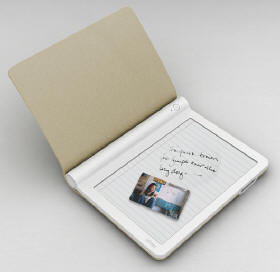
Microsoft Courier concept

From Gizmodo at:


Microsoft are showing their Courier concept. I'm not sure Microsoft have been too successful with these concepts, with the UMPC, and others falling by the wayside over the years. Another view would be that they have been way ahead of the game and foresaw/inspired the NetBook and other trends. Eitherway, not it's this "Media computer" as I call it.

Viewing the videos I link to above, they seem to be proposing Personal productivity type applications, but using more of a printed media viewing experience.


Now that I think about it, this reminds me of work at Microsoft Research that I saw over a year ago, with two small UMPCs stuck together. Doing a search I found a number of relevant pieces published from the MS Research work:


I've long been an advocate of the open-close book concept. Note that I don't say "dual screen". That is because my idea scenario is a single flexible display that is "dual" A5 portrait screens in the format shown above, but if opened fully it can also be a single A4/A sized screen when rotated 90 degrees. That's a challenge for flexible displays and electronics that will have me waiting a while, meanwhile I like these designs.

The active stylus/tablet combination is in my opinion a good one. Whether done by a Waacom-style (smarts in tablet), or a "smarts in the pen" method. Separate stylus and (finger) touch input and allow more advanced pen usage and combined use. just like you do with real paper!

My personal experience of using the buttons on a stylus has been very poor. It's not easy to hold the stylus in a comfortable way for writing and to be able to then press a button without changing grip and moving the stylus....I'd keep pursuing the goal of imitating a pen/pencil. e.g. switch it around to erase works well.
For pen color, width, type selection I'd have some two-handed twist selections or controls on the pen as they won't be done mid-stroke and need to have fine control and be seen clearly by the user.

Will MS have the moxy to release a "computer like device" that doesn't have Windows as the UI?
Recent Zune developments (and thinking about it, the Surface also) seem to suggest they maybe open to that idea, but I'll still be surprised if we see a device with a UI like this from MS in the near term.

January 12, 2009

Flexible Reader part of Sony's Flexible OLED concept display


Will your next laptop look like that, or your next (first?) eBook reader?

This came out a while back at CES, but I still thought it was interesting.

See the original post from Engadget.

Sony are pushing forward with OLED in the market, as evidenced by their OLED TV. Here they show design concepts for products using OLED displays on flexible backplanes (and front-planes for that matter) and amoung them is an eReader.

For the Reader, it seems the flexibility is put more to purpose of robustness, and "feel" of a book than any attempt at a roll-up book. That´s a good call in my book.

How it would fold shut is not obvious from the images in the gallery.

November 20, 2008

Dual display eBook reader research

On the UK's PocketLint gadget web they have recently posted a video on research from Maryland and Berkeley Universities into more advanced document navigation.


As part of that research they developed further the concept of a dual-display eReader and how it can be used to ease certain types of reading, and some of the more complex navigational tasks.

This would be most useful beyond your standard "linear reading" of a book, in such tasks as document reading, cross-referencing and production by a knowledge worker, student, professor or other.

I have long advocated the two screen approach. In the future I hope technology will evolve so that in fact it can be one large flexible screen that can be used as one large screen in portrait or landscape, or as two smaller portrait pages side by side. This is my 200% goal for the "screen space to device size (closed) ratio".

The video is well done, and three and a half minutes long, so just go ahead and watch it.

November 11, 2008

Oone-Laptop-Per-Child Rev 2.0

Original Post May 21st 2008.

Following on from the previous Samsung (OLED) post with a "hard" keyboard, here comes the latest thinking from Negroponte at OLPC for their Rev 2.0 laptop, which has a similar keyboard idea.

Gizmodo post here.
It's a dual-touch-display form factor that can be used in three main modes:-

  • notebook, with one touch screen acting as a (hard) keyboard
  • dual-screen eReader (my favorite configuration)
  • dual-screen flat device for gaming etc. This is along the lines of a pet idea of mine for a flat, touch sensitive (and device/game-piece detecting) gaming board

Book Mode:

Game-tablet mode:

The designer of the original OLPC display (Mary Lou Jepsen) is creating her own company (Pixel Qi) around that work, and other and follow-on ideas.

Among other details, this will make localization of the keyboard easy, but I still don't fancy much typing on hard glass. Roll-on any work on deformable input surfaces, haptic feedback, etc.
Keyboard size seems more suited to kids, rather than us sausage fingered techies...

OLEDs are coming

Original Post from May 15th 2008.

Display manufacturers are also revving their engines before the SID 2008 conference.

Here Samsung talks about a 12.1" OLED display based laptop they will be showing...

Nice...

I've been sure for some time OLEDs are going to take the LCD market by storm, even faster than most people I talk to predict.

I'm holding my breath still for a sweet OLED-based iPhone, that I'm sure is lurking behind their "Mostly black" UI, designed to take advantage of the fact that OLED's consume power based on how much light each pixels generate (unlike LCD's where power consumptions is dominated by the back-light).

A bit of fun with books and computers

Original Post from April 21st 2008.

Yanko design has a bit of fun putting a computer in a book, see their web entry here.

Papyrus student eReader concept

Original Post from April 21st 2008.

A new (concept) take on the "student scenario" here


"Papyrus’ stripped-down, specialized interface makes it accessible to a broad range of users. It’s simple enough that faculty and other adults won’t be intimidated or annoyed, yet functional enough that students will feel like they’re using something current."

I just wish we had a color eInk screen that looked like their mock-ups.

They have tried to leverage some of the web/blog/social networking methods into this still mainly "textual" device (user generated content, tagging, comments, etc), and that shows in the UI mock-ups where there is a kind of dialog "overlay" onto textbooks or classroom material.

It is interesting that they think about it for faculty and not *just* the student to consume, and address the issues of student participation.

iRex Illiad Review from ARS

Original Post from March 2nd 2008.

Here is a recent review of the iRex Illiad by ARS Technica is in general pretty standard stuff, so it won't have any new information for "regular readers of README", and what they pick-up on is the most interesting part of it....

They pick up on one of the Iliad's key differentiations: Pen/Stylus input on the screen:
"Writing directly on the screen makes the ebook feel that much more like a "real" book."
and then they explore a number of uses it can be put to, from photo mark-up to sheet music writing and comment.

This comment "One byproduct of the custom stylus is that the screen doesn't respond to fingernails, stray knuckle taps, or non-iRex styli. This is a Good ThingTM... until you lose your stylus." is an interesting one.

The *addition* of Waacom stylus input (vs. say, Sony PRS eReader and others) leads ARS to think of finger touch input - their thinking conditioned by resistive touch display devices like PDA's where the stylus input and finger input is with the same mechanism and do both work.

They then pick up on the correct fact that annotations via the stylus are then of limited use (or accessibility) outside of the device (or even inside the device):
"Chief among them is the fact that annotations can't be easily passed back to the PC."
This doesn't detract as much as it may sound from some positive reasons for having stylus input, but I think it does correctly highlight the limited extent to which handwritten input or "digital ink" is a full-citizen in our modern computing world and the current limitations in how we can manipulate it and what we can do with it....

Unfortunately Adobe keep PDF fairly locked-up with regards to adding "ink annotations" to existing PDFs, something we fought against in Digital Pen and Paper. iRex seemed to have tried to get around that by re-printing the PDF to a new PDF with a PDF printer, but I don't think the annotations will be *real* PDF annotations that can be switched on and off, copied etc etc.
iRex's choice of a proprietary format (even if XML based) for digital ink is arguable as well, and maybe they should consider inkML.

If your handwriting is good and you pay the extra money for the PC based Vision Objects ICR software, you can convert your notes to text on the PC, but that's more for note taking than annotating.

They go on to cover reading and getting content and the MobiPocket Reader which is the chosen iRex path for Book content. Which reminds me to use my MobiPocket reader more, it's got some interesting features around RSS feeds, blogs and other content and some fun newspaper layouts of them....

Dyson design award eBook concept

Original Post from February 27th2008.

Here's the Engadget article, and here's the full article at the student award website.

Here's a photo....

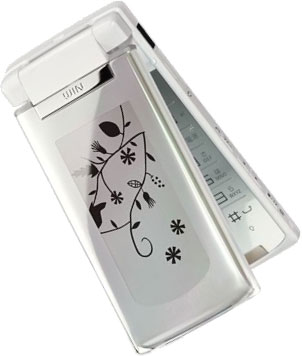
ePaper as product “decoration”

Original Post from February 7th 2008.

See below an image of theW61H phone handset manufactured by Hitachi Ltd, which uses e-paper as the back panel. The e-paper has a screen size about the same as that of a 2.7-inch display.

The users can select an image to be displayed on the e-paper from the total of 95 patterns including animations as well as still images. When the phone receives a call, sends/receives e-mail or sounds an alarm, the users can enjoy watching the image change on the back panel, in addition to the standby screen.

Just a small step from there to e-paper wall paper at home....

Flexible Display Design Concepts - contest

Port original Post from January 15th 2008.

This is not recent news, but thought you might be interested anyway - I just came across it recently.

Some time ago Plastic Logic sponsored a design competition, and you can see some of the winners with a UK Design school, and they generated a number of ideas including some eReader concepts, at PlasticLogic's Life Is Flexible contest web page.

iriver e-book prototype device at CES 2008

Original Post from January 14th 2008.

At CES recently there have been a few demos and things around eBooks, but nothing massive.

Here is a short news item about a concept that iRiver showed for an eBook. (Engadget version here)

but there's not much more to it than the image shown.

If anything the most interesting things is that iRiver continue to play with ideas in the eBook space and so maybe enter it at some point in the future.
I'm interested by the idea of packing electronics into a cylindrical spine area, to reduce the thickness (and weight) of the page area. I think I'd need to hold it for a while and use it to read to see if that's actually better ergonomically.

This is not iRiver's first showing in the eBook area as they also showed this two-display concept a year ago.

that never made it to market during this year. See the original article on that demo here at Engadget.

Fujitsu Fabric PC concept

original Post from January 11th 2008.

This design concept PC from Fujitsu has been out for a while, but I've found a few more images of it that you might enjoy.

I like a number of things they've done, including the curved display, the way the keyboard folds out to reveal a very large display and the overall look and feel is more notpad/book/folder like.
Check out the photos (with a few other concepts mixed in) here on Gizmodo.

November 9, 2008

You scratch my back, I’ll move your pointer

Original Post from September 28th 2007.

This Information week article reports that Microsoft is working on this interesting twist on the "touchscreen" where a portable computing device has a normal touchscreen on the front side and a touch surface on the back of it.

This shows a simulated view of the users hand and fingers as if the display was semi-transparent!

Why do this? They state "early tests on the prototype revealed that "many users found touching on the back to be preferable to touching on the front, due to reduced occlusion, higher precision, and the ability to make multi-finger input."

I do think that when I holding a device like this (i.e. without a keyboard, maybe like an eBook) in front of me I tend to want to have more of my hands behind it than in front of it, mainly due to weight and perceived fragility of it - but a touch screen forces you to have a lot of your hand and fingers in front of it.

This means you don't have it held as firmly as maybe you should (or would like to) and/or that you are continually changing your hand position back and forth when reading/interacting-with-it....so maybe this idea has some mileage.

I assume it will differentiate between your fingers and your lap, knees, a desk, etc etc..

November 8, 2008

Ricavision Home eReader

Original Post June 28th 2007

I found this posting on Sideshow Devices for a Windows Sideshow device that is an eInk based eReader intended for the home.

It's a concept demo made by a company called Ricavision that seems to be working with (or leveraging the names and marketing dollars of) Microsoft and Intel.

Here is a link to a PDF Press Release of it.

The gist of it is that it's an eInk display eReader device with wireless (Wi-Fi) connectivity back to the PC running Windows Vista. It's configured on the PC as a sideshow device and hence it can act as a display for the Windows machine, content to view can be pushed to it (and cached) and it seems it can also control to some extent the Windows PC (from the Sofa?).

I quote:

"The Ricavision Home E-Reader enables the user to cache a large number of pages, including entire books, on the device so it can also be used out of wireless range of the Windows Vista-based PC. The Home E-Reader also includes stylus capability. It uses SideShow as the primary GUI and Windows Vista as the means by which pages are actually rendered for display on the device.

As small and lightweight as a single book, the Ricavision Home E-Reader allows users to download and take along newspapers, books, and documents, or upload them to share with family, friends, or co-workers.
In addition, the stylus capability enables the user to make notes that can be easily transferred to a PC and then transmitted to others. If desired, friends or colleagues can add their own comments or edits and return the notes to the original user."

Not sure I 'get' the big advantage of this over an un-tethered eBook that connects back by USB to the PC.

I suspect the big advantage is that if you do it like this, using the new SideShow functionality from the newly introduced Windows Vista - then you can count on a lot of visibility, a few references in Bill Gates' keynotes, and a pile of Microsoft Marketing cash to help get your start-up's product into the press and the blogs (like this one).

November 7, 2008

Intel. on Intel

Original Post from May 2007
Here are intelligence reports on a couple of things related to Intel.

First, a Patent Application from Intel highlighted on Engadget and Ars Technica among other places: Seems Intel have done some work on flexible reflective displays, magnetic in this case.

I wouldn't get carried away by this fact, extrapolating developments, products and imminent new introductions from a Patent filing or grant, like many Apple watchers seem to do.

These "patent watchers" see every patent application as an indication of the imminent introduction of a radical new product. If you have ever worked at a large technology company then you will know that all types of stuff get patents filed on them, with no explicit strategy or intention to productize in the short term (only if!).

Second, Intel have shown a concept of using an eInk (bi-stable, reflective) display on the outside of a laptop. This is highlighted on PC Pro web, which annoyingly forces you to register to view after a while.
This Intel work leverages the feature called "SideShow" that Microsoft put into Windows Vista for ancillary displays on computers running it.
See more on the Intel concept here and others on the same SideShowDevices website.